Showing posts with label Continous Deployment. Show all posts

22 September 2016

Blue Green Deployments with AWS CloudFormation AutoScalingRollingUpdate Policy


At tado° we are doing blue-green deployments for our web and application servers by simply updating AWS CloudFormation stacks. Our architecture is classical: EC2 instances in an Auto Scaling Group (ASG) behind an Elastic Load Balancer (ELB). 


We follow the immutable server pattern and never modify existing instances. Instead, we are use the AutoScalingRollingUpdate policy to replace old instances with new ones. CloudFormation has the additional ability to roll back to the previous state if something goes wrong. If the old instances keep running the rollback is very quick without any user visible downtime.

The problem is that the AutoScalingRollingUpdate policy was not invented for blue-green deployments but for replacing instances in small batches. Configuring the policy to properly do a blue-green deployment in one batch was more tricky than expected. CloudFormation still lacks some little piece of functionality which so I needed to workaround.

The AutoScalingRollingUpdate policy determines how instances get replaced when the LaunchConfiguration changes. It has two important properties:
  • MaxBatchSize controls how many instances can be created or terminated at the same time. A blue-green deployment is a special rolling update done in one batch. First, create all new instances, wait until the application is warmed up and healthy, and then terminate all old instances. We set MaxBatchSize to equal the MaxSize of the ASG to create and terminate all instances in one big batch.  
  • MinInstancesInService controls how many instances must keep running during the update. If you omit this parameter it defaults to zero. This means CloudFormation will terminate all old instances while starting new ones in parallel. Clearly not what you want for zero downtime blue-green deployments. This should be set to the current number of instances in service. 

One of the benefits of Auto Scaling is that it adapts the number of running instances to the current load. E.g. during the night two instances might be sufficient but at prime time you need ten. The number of needed instances is reflected in the DesiredCapacity property of the ASG and changes over time.

Autoscaling instance over time
So it is vital to set MinInstancesInService to the current DesiredCapacity of the ASG before starting the update. But when we deployed a service during prime time we saw that instances were terminated until we had only two left when we needed ten! Not good!
I made two mistakes. The first was hard coding the DesiredCapacity of the ASG in our CloudFormation template so the current value got overwritten on each deployment. In this case, the ASG instantly adjusts its capacity. Fixed that by just not specifying the DesiredCapacity at all in the template. The second one was naively setting MinInstancesInService to the MinCapacity of the ASG. Bummer! I tried to get the current value with the intrinsic function Fn::GetAtt that gives you access to attributes of stack resources. But when I tried it out, CloudFormation complains about not knowing this attribute. It turned out that no AutoScalingGroup attributes are exposed inside a CloudFormation template! As a workaround, I used the CloudFormation API to query the name of the ASG resource and were then able to use the AutoScaling API to get the current DesiredCapacity. I also introduced an external parameter and assigned it to the MinInstancesInService property so I could pass this value to the stack before applying the update. Luckily, we are using AutoStacker24 to update stack so this workaround could be done with a few lines of ruby code. But it would be even better if AWS would expose ASG attributes to the Fn::GetAtt function out of the box.

If you are still reading there was another interesting issue with TerminationPolicies property. Several times experienced the strange behaviour that on rollback (e.g. because of failing healthchecks) CloudFormation first creates new instances with the old LaunchConfiguration while terminating the still running old instances. To fix this I configured the OldestLaunchConfiguration and OldestInstance policies in exactly that order.  In addition to keeping the existing instances in case of rollbacks it also allows us to do instance recycling. Some services start to get slower and slower after a few days of work, so an easy way to fix this was to scale up manually, wait until the new instances are in service and then scale down again. This will automatically terminate the oldest instances.

Learnings

  • don't specify DesiredCapacity on the AutoScalingGroup in the template, it should be determined by the scaling policies of the ASG 
  • Set MaxBatchSize to equal the MaxSize of your ASG to have only one batch.
  • Set MinInstancesInService to the current number of running instance. Ideally, this should be MinInstancesInService: "@ASG.DesiredCapacity" or {"Fn::GetAtt": ["ASG", "DesiredCapacity"]} but CloudFormation doesn't support it (yet). Use  API/scripting to work around.
  • Use TerminationPolicies for making rollbacks keep the existing instances
    • OldestLaunchConfiguration
    • OldestInstance

28 January 2015

GO TeamCity GO!

(tldr; Why TeamCity is still a time and money saving tool that can also be used for Continuous Delivery)

Today Continous Integration is a widely adopted practice and Continuous Delivery is the new state of the art. Many companies are now using (or 'abusing'?) their existing CI infrastructure to build pipelines for Continuous Delivery.

It turns out that this exercise works very well with tools like Jenkins, Hudson or Teamcity. The concept of having 'Builds' that are triggered by 'Commits' and producing 'Artifacts' can be easily extended to create delivery pipelines. Add the ability to chain 'Builds' and extend the trigger mechanism to fire when all preceding builds have been successfully finished. A 'Build' can be a classic compile build, a complex acceptance test, or the deployment to machines. It is just some kind of 'Job'. The possibility of 'Scheduled' triggers transforms your CI system to be a generic automation system. The traceability of 'Jobs' with logs and build numbers, some basic metrics and a nice Web-GUI lured many sysadmins exposed to CI systems to use them for automating all kind of stuff.

That is the way AutoScout went with TeamCity during the last years and with good success. Today, AutoScout has more than 1000 active build configurations executed by 51 agents. Many of those 'builds' aren't actually building stuff, but are

  • deploying apps to servers
  • updating elasticsearch indices
  • running database schema migrations
  • orchestrating fleets of test agents
  • and other crazy stuff you won't believe ;-)

We are not always happy with TeamCity. It tends to be a clicky-clicky tool producing clickops, because it has a nice GUI but a hard to use REST-API. And if you use Builds  for orchestrating other machines to do the real stuff (e.g. deployments) then you do not make good use of your agents resources. The agent is then blocked by idle waiting, wasting resources that cost real money. Over the years, TeamCity accumulated so many features that you need experience to do things the right way without shooting yourself in the foot.

A few months ago AutoScout decided to change its tech stack from DataCenter/Windows/.NET to Cloud/Linux/JVM. As this change is quite big and risky we have hired a lot of expertise from ThoughtWorks, the company that is also a well known proponent of Continuous Delivery. Their experts suggested to abandon TeamCity and give GO a try because GO is open source and built with Continuous Delivery in mind.

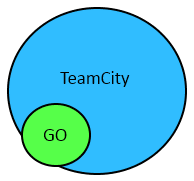
Now, after some hands on experiences with GO, I believe that you shouldn't replace a working and mature CI System like TeamCity with GO. My main argument is that GO is just another CI-Tool with no fundamental difference to TeamCity, Jenkins or whatsoever. It shares the same disadvantages
(clicky-clicky, server-agent model) but lacks many productivity features that TeamCity provides in a mature and battle proven way. Indeed I miss so many things in GO that I liked in TeamCity that I start a rant right now ;-)
GO features are mostly a small  subset of TeamCity features

Displaying Logs

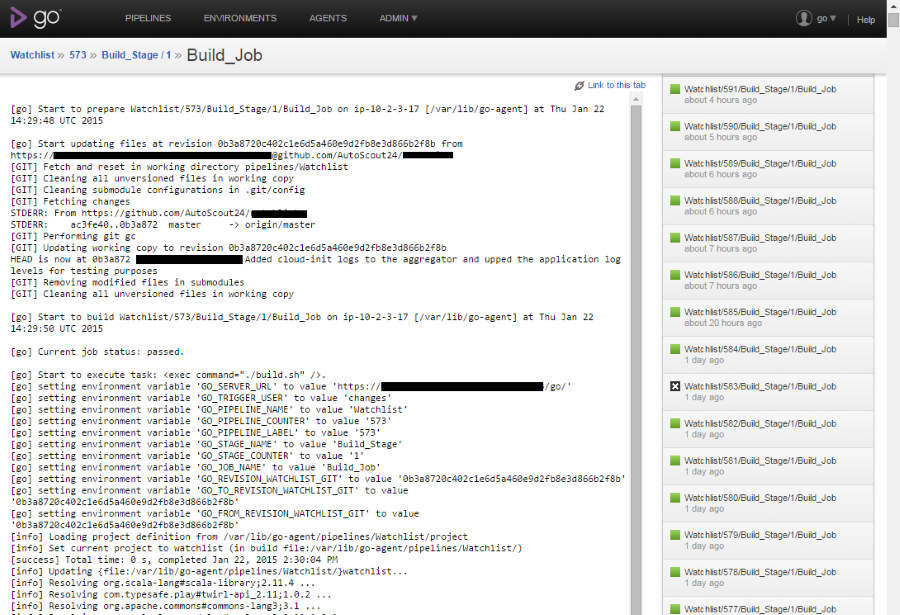
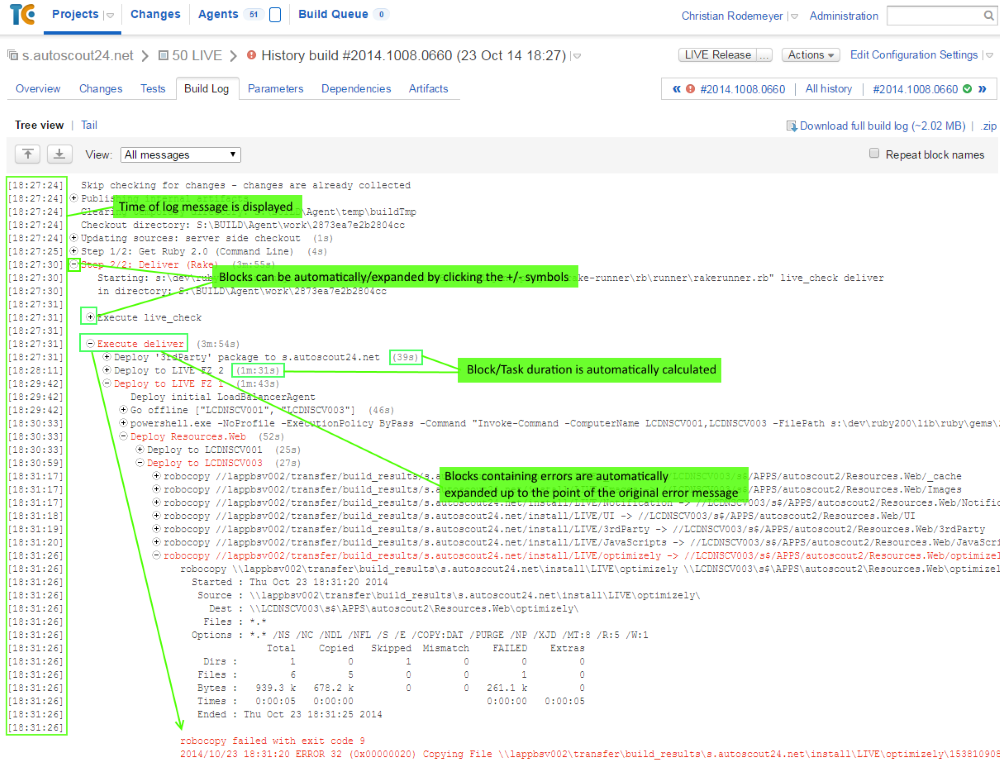
Investigating build logs is one very important use case whether you need to find the reason why a build fails or you want to know what a build makes slow. GO is a complete disappointed in this point. It shows you only a raw black&white dump of stdout and stderr mixed together. No indicators or any kind of help that could support you in analyzing. Maybe because only can start shell scripts. TeamCity, in contrast, knows what it executes (e.g. msbuild, rake, test runners, ...). It uses this knowledge to enhance logs with hints that makes them easy to analyze. First of all, errors are extracted and shown in a prominent place, so most often you don't need to go to the build log at all. If you drill down to the log, the log is presented in a hierarchical view, where blocks containing errors are expanded (and colored in red) while the rest of the log is collapsed. TeamCity also shows you for each line its ingestion time and the accumulated durations of tasks and subtasks. That makes it very easy to see where the build spent time.  GO can't even display a timestamp, so if your build takes 20 minutes, you have no clue which task caused this delay. TeamCity just tells you which task took how long, so you know immediately the reason for the performance degradation.
GO displaying a build log

TeamCity displaying a build log

Red Builds aka Failed Jobs

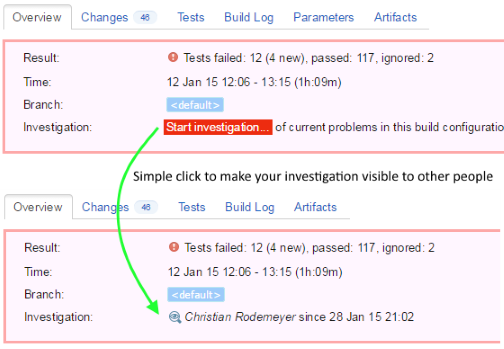
Red builds or failed jobs need to be investigated. In GO you can do silly things like wearing hats or hope that somebody takes care, in TeamCity you can start investigating a build and then the rest of the team knows that you are taking care.

Speaking or red builds, TeamCity has many ways to mark a build as failed even if the job returned a success, e.g.

  • the number of tests suddenly dropped significantly
  • the number of ignored tests increased significantly
  • the build took significantly longer than the last ones
  • the build times out
  • ...
GO can't do any of those things.

Living community 

Just try to google for some build related problems: Lots of answers for TeamCity, none for GO (which might be related to its name ;-) I wasn't able to find a GO community, again that may be the name, but visit the official GO community site or count the available community plugins. (most of the are written by ThoughtWorks employees anyway). TeamCity has a living community and in case googling doesn't solve your problem, Jetbrains has a fast and helpful support. 

Native AWS support 

TeamCity can operate a fleet of agents on Amazon EC2 instances. Depending on the current load (pending jobs) it can create, start or stop agents. This allows you to use very fast C4 instance types, which will make your builds faster, but in a very cost effective way, because those instances will live only for those few hours per day in which they are actually needed. GO again has nothing to offer in this area, you have to build scaling up and down by your own script or just pay 24/7 for agents you don't use.

Miscellaneous TC features where GO is inferior

  • Auditing/Permissions: If you have more than one team TeamCity allows you manage permissions and it has a good auditing feature that shows you which user changed what and when. GO can show you the diff between two versions of the global config.xml file.
  • Custom build numbers in TeamCity, incrementing only numbers in GO.
  • Sophisticated environment variable setting in TC, predefined ones in GO 
  • Jobs can interact with Teamcity, e.g. update status data, nothing in GO
  • Jobs can have arbitrary names and descriptions in TC, GO doesn't allow whitespace in names, leading_to_strange_conventions.
  • all thinkable variants of triggers and dependency chains between jobs allows you to build sophisticated pipelines in TC
  • job queues are visible in TC, making it easy to debug non starting and pending builds. In GO you have no hint when you job will start or to manipulate the queue when something went wrong. I have seen jobs hanging in GO forever because agents requirements were missing.
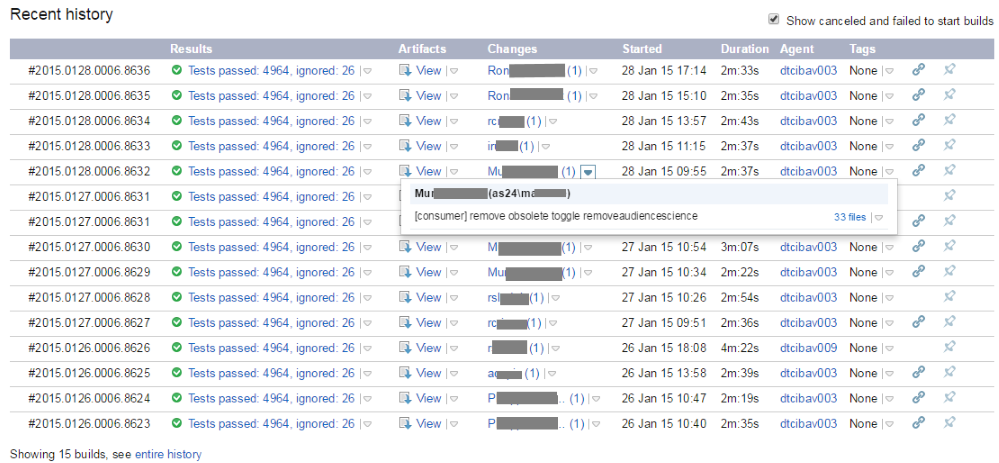
  • Good history of deployments/builds from the past. You see which commits are in with deployment, and you can rollback to an older version directly from this history view.

There are still more points where TeamCity outperforms GO (backups, recovery, auto updating agents, ...). I hope I have listed enough to show you mature TeamCity is compared against GO. If you have a problem there is a very high chance that TeamCity has a solution. With GO you will find yourself running into limitations or living with crude workarounds which make your teams less productive. 

Conclusion

If you have a working and mature CI System (Jenkins, TeamCity, ...) don't switch to GO just because you want to do Continuous Delivery. GO has the same disadvantages but lacks many important productivity features. Either evolve your existing CI System to also deliver software or try out a radical different approach like hubot deploy.

27 September 2012

Embed Url Links in TeamCity Build Logs

We at AutoScout24 are using TeamCity for our Continous Integration and Delivery. One step in our  Release Pipeline is integration testing in different browsers. If our test framework detects a problems it will create a screenshot of the breaking page. This screenshot contains valuable information that helps our developers to quickly analyze the issue. As an example, our test servers are configured to send stack traces which are visible in the screenshots.

But it seams that there is no way to include links in TeamCity build logs. TeamCity correctly escapes all the output from test and build tools so it is not possible to get some html into the log. So I investigated TeamCity extension points. Writing a complete custom html report seemed to be overkill because the test reporting tab worked really well. Writing a UI plugin means to learn Java, JSP and so on and as a .NET company we don't want to fumble around with the Java technology stack. But as a web company we know how to hack javascript ;-)

There is already a TeamCity plugin called StaticUIExtensions that allows you to embedd static html fragments in TeamCity pages. And because a script tag is a valid html fragment we could inject javascript into TeamCity. So I wrote a few lines of javascript that scan the dom for urls and transforms them into links. With this technique you get clickable links in all the build logs.


What you need to do:
  1. Install StaticUIExtensions 
  2. On your TeamCity server, open your "server\config\_static_ui_extensions" folder
  3. Open static-ui-extensions.xml
  4. Add a new rule that inserts "show-link.html" into every page that starts with "viewLog.html"
      <rule html-file="show-link.html" place-id="BEFORE_CONTENT">
        <url starts="viewLog.html" />
      </rule>
  5. Create a new file "show-link.html" with this content:
    <script>
      (function ($) {
        var regex = /url\((.*)\)/g
     
        function createLinksFromUrls() {
          $("div .fullStacktrace, div .msg").each(function () {
            var div = $(this);
            var oldHtml = div.html();
            var newHtml = oldHtml.replace(regex, "<a href='$1' target='_blank'>$1</a>");
            if (oldHtml !== newHtml) div.html(newHtml);
          });
        }
     
        $(document).ready(createLinksFromUrls);
        $(document).click(function () {
            window.setTimeout(createLinksFromUrls, 50);
            window.setTimeout(createLinksFromUrls, 100);
            window.setTimeout(createLinksFromUrls, 500);
        });
    })(window.jQuery); 
    
    </script>
    
This javascript searches for the url(*) pattern and replaces it with <a> tags.  Because TeamCity uses ajax to load the stacktraces when you expand a tree node, I used timers to delay the dom processing until the ajax call suceeded. Now you can log something like "url(http://www.autoscout24.de)" and this will be transformed to <a href="http://www.autoscout24.de">http://www.autoscout24.de</a>.

Voila, Mission completed.

06 August 2011

More cool Feature Toggle Features

We have extended our Feature Toggle implementation with two more features:

  1. an activation interval that determines in advance when a toggle is on or off
  2. a toggle that is only enabled for a certain rate of visitors

We release new versions every two weeks and sometimes the activation of a feature is coupled to a fixed date by marketing or legal reasons. You could argue that the feature itself should implement the date checking but it was attractive to use the existing Feature Toggle infrastructure. Our existing implementation could be easily extended to support this, but I admit that it added complexity and that the implementation is now a little bit impure in the sense that it is now no longer exclusively used as a development tool.

The Feature Toggle configuration is still simple and readable. Everything except the name attribute is optional so you have to specify only the borders you need:

<toggle name="myFeature" enabled="true" /> 
<toggle name="myFeature" enabled="true" from="2012-01-01" /> 
<toggle name="myFeature" enabled="true" to="2012-06-01" /> 
<toggle name="myFeature" enabled="true" from="2012-01-01" to="2012-06-01" />

The second feature was inspired by the allowHttpOverride property original developed for testing purposes. If a user visits our page the toggle decides randomly with the given rate if the toggle is on or off. The result is stored inside a browser cookie and never changed. So it works for features that span several pages or workflows. The rate feature is extremely useful if you plan to do canary releases for only a few percent of your users. If everything works fine you can slowly increase the rate until it reaches 100%.

Every toggle attribute can be combined with every other attribute, e.g. a toggle that is on only for a specific interval with a specific rate and overriding it per cookie or query parameter is not allowed:

<toggle name="myFeature" enabled="true"  
        from="2012-01-01" to="2012-06-01" rate="42" allowHttpOverride="false" />

26 June 2011

A Cool 'Feature Toggle' Feature

Recently we gave our Feature Toggles the possibility to be overridden at runtime. For a web application I found this extension quite useful and its implementation was easy and straightforward. This is the configuration for toggles that are always on or off:

<featureToggles>
    <toggle name="aFeature" enabled="true" />
    <toggle name="anotherFeature" enabled="false" />
</featureToggles>

If I want that the toggle can be overridden at runtime I just add one additional attribute:

<featureToggles>
    <toggle name="aFeature" enabled="true" allowHttpOverride="true"/>
    <toggle name="anotherFeature" enabled="false" allowHttpOverride="true"/>
</featureToggles>

Now if a visit a page, say www.atombrenner.de/test,  I can modify the url to be www.atombrenner.de/test?aFeature=off and now for the complete request the toggle is off. For workflows that cover more than one page request we use cookies. Just create a new cookie with your favorite cookie manager (I like the 'Edit this cookie' plugin for Google Chrome very much).

image

The name of the cookie must be the name of the toggle you want to override. Allowed values are: 0, 1, off, on, false, true. If both a query string value and a cookie value is given, the query string parameter wins.

If find this feature extremely useful because it allows you to toggle very quickly the feature on or off, without the need for recompiling or reconfiguring. This enables you

  • to always test that your app is still stable when the new feature is turned off
  • to give testers or managers a quick preview of the feature during development
  • to provide external partners a preview of the feature in the live environment, so they can test and accept features before it goes public.

12 June 2011

Feature Toggle or Feature Branch

I'm working in company that releases every two weeks with the goal to do weekly releases and eventually daily releases. We introduced Feature Toggles for the development of features that overlap a release without destroying Continuous Integration.

Recently I noticed that people start using Feature Toggles for features that take only a few hours to implement. In this case the effort to setup, configure and test the Feature Toggle is easily more than 50 percent of implementation effort. It would be much more efficient to create a branch and merge it one or two days later back to the trunk. The cost for having no continuous integration is less than the cost for using a toggle in this case.

Why are people doing this? One answer could be that they are entrapped by the possibility to dynamically turn features on or off. Another is process thinking: because there was a process that enforced feature branches for feature development it is believed that you now must use Feature Toggles. Another company specific reason is that we had feature branches coupled with a heavyweight process (including the setup of a complete cloned environment with automatic builds, databases, dozens of service, ...) that was so painful that everybody shivers when hearing the word Feature Branch.

Make sure that you are using feature toggles and feature branches for the right things. A lightweight feature branch needs much less brainpower than implementing of a toggle for the modification of an legacy feature.